
Overview
Making HTTP callouts from Apex to external APIs (payment gateways, ERP microservices, cloud storage, or LLM endpoints) presents significant architectural challenges around credential storage, authentication lifecycle management, and security governance.
Historically, developers often stored API keys in Custom Metadata Types or hardcoded authorization headers directly in Apex classes. This exposed systems to credential leaks in version control, violated security compliance audits, and required custom Apex logic to manage OAuth 2.0 token refreshes.
Next-Generation Named Credentials resolve these vulnerabilities. By decoupling endpoint definitions from authentication protocols and user permissions, they allow developers to execute zero-code authenticated callouts directly via the callout: URL pseudo-protocol.
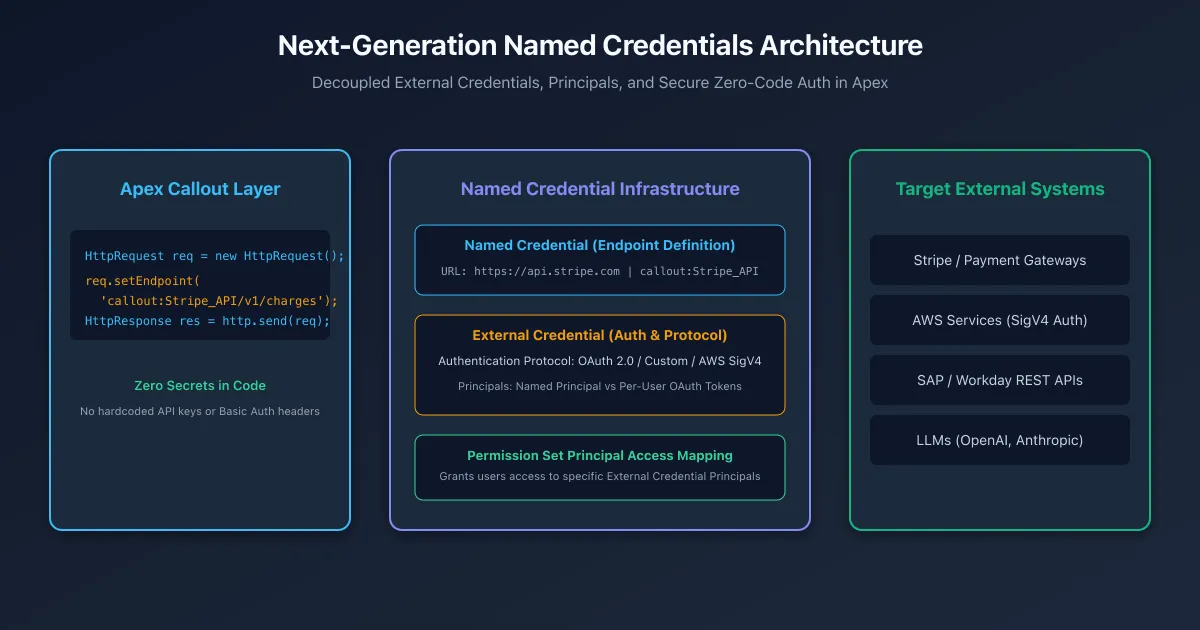
Architectural Breakdown: Named Credentials vs External Credentials
Modern callout security separates concerns into three distinct metadata layers:
1. Named Credential (The Endpoint Definition)
Defines where the callout goes:
- URL: Base endpoint (e.g.,
https://api.stripe.comorhttps://s3.amazonaws.com). - External Credential Reference: Links to the authentication profile.
- Header Options: Configures whether Salesforce automatically generates standard HTTP headers (
Authorization,Host).
2. External Credential (The Authentication Profile)
Defines how the callout authenticates:
- Authentication Protocol: OAuth 2.0, AWS Signature Version 4 (SigV4), Custom Headers, or Basic Auth.
- Principals: Defines authentication identities (e.g.,
Named Principalfor a shared service account vsPer-Userfor individual user OAuth tokens). - Authentication Parameters: Client IDs, Client Secrets, Token Endpoints, and Scopes.
3. Permission Set Mapping (Access Governance)
Defines who is allowed to make the callout:
- Access to an External Credential Principal is controlled via Permission Sets or Profiles under External Credential Principal Access.
- If a running user lacks permission set access to the specified principal, Salesforce immediately rejects the callout before making any network request.
Example: Executing an Authenticated Callout in Apex
With Named Credentials, the Apex callout code contains zero credentials, headers, or token logic:
public with sharing class PaymentGatewayService {
/**
* Executes an authenticated payment charge via Stripe Named Credential.
*/
public static HttpResponse createCharge(Decimal amountInCents, String currencyIso, String customerToken) {
HttpRequest req = new HttpRequest();
// Use the callout: schema followed by the Named Credential DeveloperName
req.setEndpoint('callout:Stripe_Payment_Gateway/v1/charges');
req.setMethod('POST');
req.setHeader('Content-Type', 'application/x-www-form-urlencoded');
// Form-encoded body parameters
String requestBody = 'amount=' + EncodingUtil.urlEncode(String.valueOf(amountInCents), 'UTF-8') +
'¤cy=' + EncodingUtil.urlEncode(currencyIso.toLowerCase(), 'UTF-8') +
'&source=' + EncodingUtil.urlEncode(customerToken, 'UTF-8');
req.setBody(requestBody);
Http http = new Http();
// Salesforce automatically injects the Bearer token / auth headers
HttpResponse res = http.send(req);
if (res.getStatusCode() != 200) {
throw new CalloutException('Payment Gateway Error: ' + res.getBody());
}
return res;
}
}AWS Signature Version 4 (SigV4) Integration
Connecting to Amazon Web Services (such as S3, DynamoDB, or Bedrock) traditionally required hundreds of lines of complex Apex code to calculate SHA-256 canonical request hashes and HMAC-SHA256 signatures.
With modern External Credentials:
- Set Authentication Protocol to AWS Signature Version 4.
- Configure Service (e.g.,
s3orbedrock) and AWS Region (e.g.,us-east-1). - Add a Principal with your AWS Access Key ID and Secret Access Key.
- Execute
req.setEndpoint('callout:AWS_S3_Bucket/my-folder/report.pdf')—Salesforce signs the request automatically according to AWS SigV4 specifications.
Frequently asked questions
What is the architectural difference between legacy and modern Named Credentials?
Legacy Named Credentials combined the URL, authentication protocol, and credentials in a single record. Modern Named Credentials separate the endpoint into a Named Credential and the authentication configuration into an External Credential with permission-controlled Principals.
How do you reference a Named Credential in an Apex HTTP callout?
Set the HttpRequest endpoint using the callout schema: req.setEndpoint('callout:My_Named_Credential/v1/resource'). Salesforce automatically resolves the base URL, performs the authentication handshake, and injects required authorization headers.
What authentication protocols are supported by External Credentials?
External Credentials support OAuth 2.0 (Authorization Code with PKCE, Client Credentials, JWT Bearer), AWS Signature Version 4 (SigV4), Custom Headers (API keys), and Basic Authentication.
How does permission control work with External Credential Principals?
Administrators grant access to an External Credential Principal by assigning a Permission Set with External Credential Principal Access enabled, preventing unauthorized users or execution contexts from invoking external endpoints.
Can Named Credentials sign AWS requests automatically without Apex cryptography?
Yes. By selecting the AWS Signature Version 4 protocol on the External Credential and providing AWS Access Key and Secret Key parameters, Salesforce automatically calculates SHA-256 HMAC request signatures in the background.
Comments
Questions, corrections and tips are welcome. Comments are GitHub Discussions, so you sign in with GitHub.