
Overview
Static application security testing (SAST) and code quality gating are critical components of enterprise Salesforce release engineering. Historically, teams had to maintain separate command-line runners for PMD, ESLint, RetireJS, and custom security scripts.
The Salesforce Code Analyzer (formerly @salesforce/sfdx-scanner) unifies multiple best-in-class static analysis engines into a single, cohesive Salesforce CLI plugin. It scans server-side Apex, client-side Lightning Web Components (JavaScript/TypeScript), third-party dependencies, and declarative Flow metadata for bugs, performance anti-patterns, and critical security vulnerabilities.
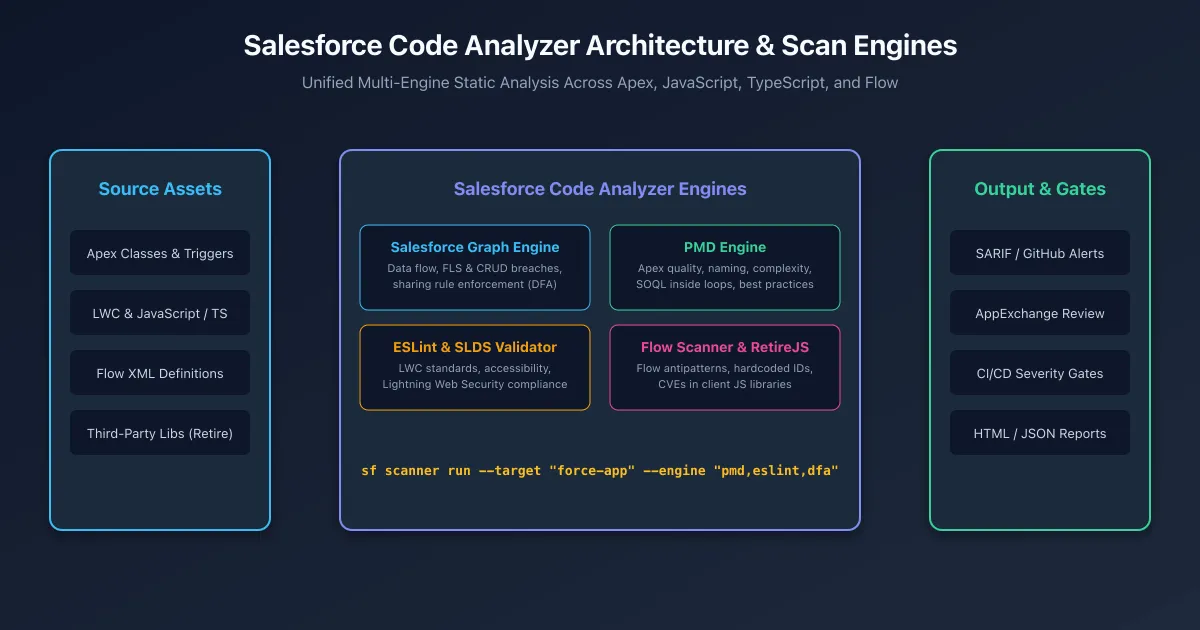
The Unified Engine Suite
| Engine | Target Technologies | What It Evaluates |
|---|---|---|
| Salesforce Graph Engine (SFGE) | Apex Classes & Triggers | Interprocedural Data Flow Analysis (DFA); path-based CRUD/FLS validation, SOQL injection tracing, and sharing rule enforcement. |
| PMD Engine | Apex | Code quality, Cyclomatic Complexity, naming conventions, SOQL/DML inside loops, and dead code. |
| ESLint & SLDS Validator | LWC JavaScript & TypeScript | Modern ECMAScript standards, component reactivity, Lightning Web Security compliance, and CSS token usage. |
| RetireJS | Static Resource JavaScript | Known Common Vulnerabilities and Exposures (CVEs) in third-party client libraries (e.g., outdated jQuery or Lodash). |
| Flow Scanner | Flow XML definitions | Unhandled fault paths, DML operations inside loops, hardcoded record IDs, and flow complexity antipatterns. |
Installation & CLI Usage
Install the Code Analyzer plugin directly into your Salesforce CLI environment:
# Install the official Code Analyzer plugin
sf plugins install @salesforce/sfdx-scanner

# Verify installed scan engines
sf scanner engine list
Running Basic Scans
# Scan all Apex and LWC code using default PMD and ESLint rules
sf scanner run --target "force-app" --format table

# Scan with high-severity violation threshold (exits with error code 1 if severity <= 2)
sf scanner run --target "force-app" --severity-threshold 2
Deep Dive: Salesforce Graph Engine (DFA)
While traditional PMD inspects individual lines of code, the Salesforce Graph Engine (SFGE) builds an Abstract Syntax Tree (AST) and traces variable execution paths across methods and classes.
It catches subtle vulnerabilities such as:
- Unchecked CRUD / FLS: Inserting or updating fields without checking
Schema.sObjectType.Account.fields.Amount.isCreateable(). - SOQL Injection via Parameter Sinks: Tracing unsanitized URL or user inputs passed into dynamic
Database.query(). - Sharing Rule Violations: Exposing sensitive calculations in classes defined without
with sharingorWITH USER_MODE.
# Run Graph Engine with path analysis across project entry points
sf scanner run dfa \
  --target "force-app/main/default/classes" \
  --projectdir "force-app" \
  --format table
Automated CI/CD Quality Gate with GitHub Actions
Enterprise development teams integrate Code Analyzer into pull request workflows. By outputting findings in SARIF (Static Analysis Results Interchange Format), GitHub automatically renders findings as inline comments on code diffs:
name: Salesforce Static Code Analysis

on:
  pull_request:
    paths:
      - 'force-app/**'

jobs:
  code-scan:
    runs-on: ubuntu-latest
    steps:
      - name: Checkout Code
        uses: actions/checkout@v4

      - name: Setup Node.js & Install CLI
        uses: actions/setup-node@v4
        with:
          node-version: 22
      - run: npm install -g @salesforce/cli
      - run: sf plugins install @salesforce/sfdx-scanner

      - name: Run Code Analyzer Scan
        run: |
          sf scanner run \
            --target "force-app" \
            --engine "pmd,eslint,sfge,retire-js" \
            --format sarif \
            --outfile code-scan-results.sarif \
            --severity-threshold 1

      - name: Upload SARIF to GitHub Security Tab
        if: always()
        uses: github/codeql-action/upload-sarif@v3
        with:
          sarif_file: code-scan-results.sarif
Frequently asked questions
What scan engines are bundled inside Salesforce Code Analyzer?
Code Analyzer bundles PMD for Apex quality, ESLint and SLDS Validator for JavaScript and LWC, RetireJS for vulnerable third-party libraries, Flow Scanner for declarative flow validation, and Salesforce Graph Engine for deep data-flow analysis.
How does Salesforce Graph Engine detect security vulnerabilities?
Graph Engine performs interprocedural Data Flow Analysis across multiple Apex classes to identify paths where unsanitized user inputs reach database sinks without proper FLS, CRUD, or sharing enforcement.
What is the CLI command to run Code Analyzer across an entire DX project?
Run sf scanner run --target force-app --engine pmd,eslint,retire-js,sfge to execute all active engines and generate a prioritized list of violations with severity ratings.
How do you output scan results as SARIF for GitHub Advanced Security?
Pass the flag --format sarif --outfile results.sarif when running sf scanner run. This produces a standard SARIF file that GitHub Actions automatically ingests to display inline code annotations on pull requests.
Why is Salesforce Code Analyzer required for AppExchange security review?
Salesforce requires ISVs to pass automated Code Analyzer scans with zero high-severity violations to ensure apps do not introduce SOQL injections, FLS bypasses, or insecure cross-site scripting into customer orgs.
Comments
Questions, corrections and tips are welcome. Comments are GitHub Discussions, so you sign in with GitHub.