
Overview
The Salesforce CLI (sf) is the foundational tool for modern Salesforce development, continuous integration, and release engineering. Built on top of the open-source OCLIF framework, the CLI unifies all platform developer tasks—org authorization, source code synchronization, automated testing, data seeding, package generation, and Agentforce configuration—into a single, high-performance command-line interface.
Historically, Salesforce developers relied on the legacy sfdx executable (e.g., sfdx force:source:push). In the modern Salesforce CLI, all commands adopt a clear, predictable noun-verb syntax (sf <topic> <verb>, such as sf project deploy start or sf org create scratch).
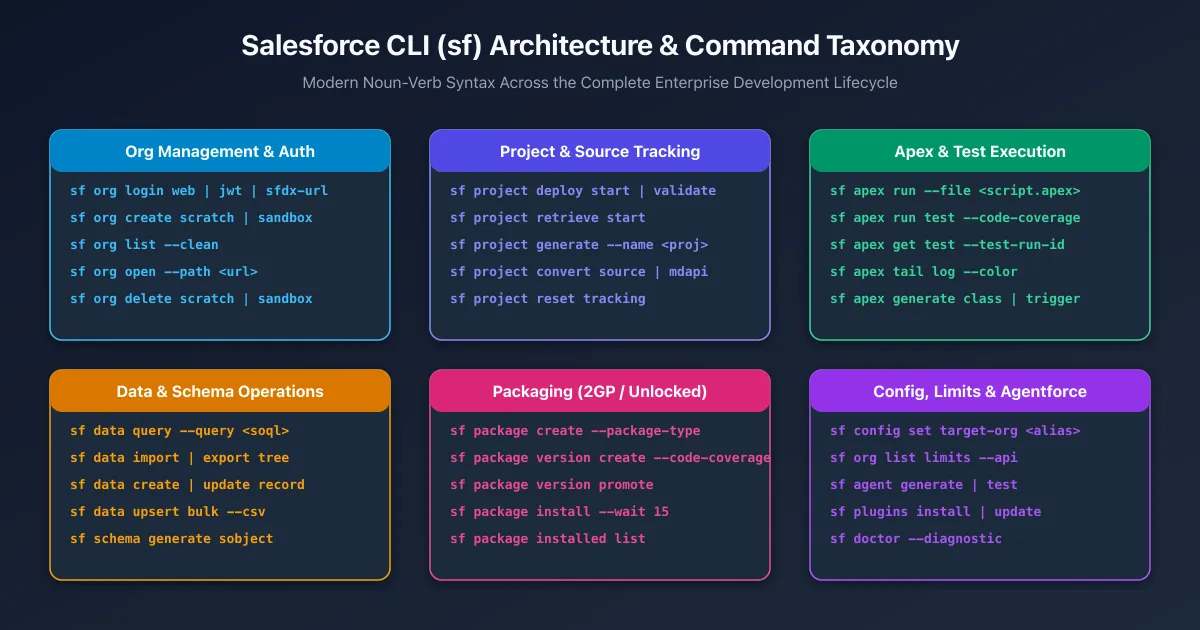
Core Command Taxonomy & Syntax
The sf CLI organizes capabilities into high-level topical domains:
| Command Group | Focus Area | Primary Verbs / Subcommands |
|---|---|---|
sf org |
Environment lifecycle & authentication | login, create, list, open, delete, display |
sf project |
Source code & metadata synchronization | generate, deploy, retrieve, convert, reset |
sf apex |
Business logic & unit test execution | run, generate, tail, get |
sf data |
Database queries & bulk operations | query, create, update, delete, import, export |
sf package |
Second-Generation Packaging (2GP) | create, version create, version promote, install |
sf config |
Local & global CLI preferences | set, get, list, unset |
sf agent |
Agentforce AI agent development | generate, test, preview |
1. Org Management & Authentication (sf org)
Managing org connections is the first step in any CLI workflow. The CLI stores credentials securely in your local user directory (~/.sfdx/ and ~/.sf/).
Interactive Web Login
Authorize a sandbox or production environment using a browser-based OAuth 2.0 PKCE flow:
# Authorize production or Developer Edition org with an alias
sf org login web --alias DevHub --set-default-dev-hub

# Authorize a sandbox org
sf org login web --instance-url https://test.salesforce.com --alias UATSandbox --set-default
Headless CI/CD Authentication (JWT & Auth URL)
In automated GitHub Actions, GitLab CI, or Jenkins pipelines where no browser exists, authenticate headlessly:
# 1. JWT Bearer Token Flow (Recommended for enterprise CI/CD)
sf org login jwt \
  --client-id 3MVG9... \
  --jwt-key-file server.key \
  --username ci-bot@mycompany.com \
  --instance-url https://login.salesforce.com \
  --alias Production

# 2. SFDX Auth URL Flow (Single string stored in CI secrets)
sf org login sfdx-url --sfdx-url-file authFile.txt --alias Staging
Scratch Orgs & Sandboxes
# Create a 7-day scratch org from a definition file
sf org create scratch \
  --definition-file config/project-scratch-def.json \
  --alias feature-lead-scoring \
  --duration-days 7 \
  --set-default

# Create an ephemeral developer sandbox from production
sf org create sandbox \
  --name DevSandbox1 \
  --license-type Developer \
  --target-org Production \
  --wait 30

# List all authorized orgs and active scratch org expiration dates
sf org list --clean

# Open an org directly to a specific Lightning page or record
sf org open --path lightning/o/Account/list?filterName=Recent
2. Project & Source Operations (sf project)
Modern Salesforce DX projects store declarative configuration and code in human-readable, fine-grained source format (force-app/main/default/).
Scaffolding a New Project
# Generate a standard DX project with manifest folder
sf project generate --name my-billing-service --template standard --manifest
Deploying & Retrieving Source
The sf project deploy start command replaces both legacy force:source:push and force:source:deploy:
# Deploy local source to the default org (uses source tracking if supported)
sf project deploy start

# Deploy a specific directory or individual Apex class
sf project deploy start --source-dir force-app/main/default/classes/InvoiceHandler.cls

# Deploy metadata defined in a manifest package.xml
sf project deploy start --manifest manifest/package.xml --target-org UATSandbox

# Validate a deployment without committing changes (dry run)
sf project deploy validate --manifest manifest/package.xml --target-org Production
Quick Deploy (Validating then Deploying in Production)
To minimize deployment downtime during weekend releases, validate first and then execute a Quick Deploy using the returned Job ID:
# Step 1: Validate and run local tests
sf project deploy validate --manifest manifest/package.xml --test-level RunLocalTests --target-org Production

# Step 2: Quick deploy using the validated Job ID (skips running tests again!)
sf project deploy quick --job-id 0AfB00000012345KAA --target-org Production
Retrieving Changes
# Retrieve metadata from the org into local project files
sf project retrieve start --manifest manifest/package.xml
3. Apex, Testing & Debugging (sf apex)
Executing Anonymous Apex
# Run an Apex script file against target org
sf apex run --file scripts/apex/recalculate_totals.apex

# Run interactively in the terminal (terminate with CTRL+D)
sf apex run --target-org DevHub
Running Unit Tests with Code Coverage
# Run all local tests with code coverage calculation and wait for completion
sf apex run test \
  --test-level RunLocalTests \
  --code-coverage \
  --result-format human \
  --wait 20 \
  --target-org UATSandbox

# Run a specific test class and output JUnit XML for CI/CD pipelines
sf apex run test \
  --class-names InvoiceHandlerTest \
  --result-format junit \
  --output-dir test-reports/
Real-Time Log Tailing
Stream live Salesforce debug logs directly into your terminal with colored syntax:
sf apex tail log --color --debug-level FINEST4. Data & Schema Operations (sf data)
The CLI allows developers to query, insert, and seed test data without opening the Salesforce user interface.
# Execute a SOQL query and format output as a terminal table
sf data query --query "SELECT Id, Name, StageName, Amount FROM Opportunity WHERE IsClosed = false LIMIT 10"

# Export query results in JSON format
sf data query --query "SELECT Id, Name FROM Account" --json

# Create a single record
sf data create record --sobject Account --values "Name='Acme Corp' Industry='Technology'"

# Seed complex parent-child relational test data trees
sf data export tree --query "SELECT Id, Name, (SELECT Id, LastName, Email FROM Contacts) FROM Account" --output-dir data/
sf data import tree --files data/Account.json
5. Second-Generation Packaging (sf package)
Second-Generation Packaging (2GP) is the modern standard for modular Salesforce application development.
# 1. Create a new unlocked package associated with your Dev Hub
sf package create \
  --name "CoreBillingModule" \
  --package-type Unlocked \
  --path force-app \
  --target-dev-hub DevHub

# 2. Build a new immutable package version
sf package version create \
  --package "CoreBillingModule" \
  --installation-key-bypass \
  --code-coverage \
  --wait 30

# 3. Promote the package version to GA status (immutable release)
sf package version promote --package "CoreBillingModule@1.4.0-1" --no-prompt

# 4. Install the package version into a sandbox or production org
sf package install --package 04tB00000012345KAA --wait 15 --target-org Production
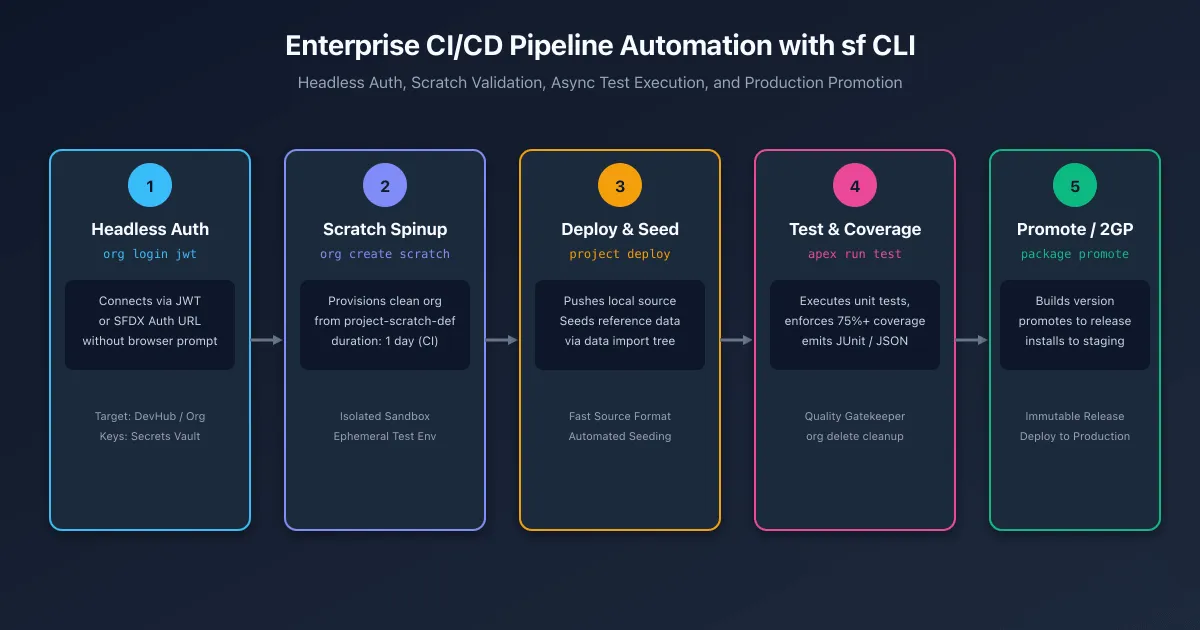
CI/CD Pipeline Automation: The Golden Flow
Enterprise teams integrate sf commands into automated continuous integration pipelines (such as GitHub Actions). Every pull request spins up an isolated scratch org, deploys code, runs unit tests, and tears down the environment.
name: Salesforce PR Validation

on:
  pull_request:
    branches: [ main ]

jobs:
  validate-scratch-org:
    runs-on: ubuntu-latest
    steps:
      - name: Checkout Source Code
        uses: actions/checkout@v4

      - name: Install Node.js & Salesforce CLI
        uses: actions/setup-node@v4
        with:
          node-version: 22
      - run: npm install -g @salesforce/cli

      - name: Authenticate Dev Hub via JWT
        run: |
          echo "${{ secrets.SFDC_SERVER_KEY }}" > server.key
          sf org login jwt \
            --client-id ${{ secrets.SFDC_CLIENT_ID }} \
            --jwt-key-file server.key \
            --username ${{ secrets.SFDC_DEVHUB_USER }} \
            --alias DevHub \
            --set-default-dev-hub

      - name: Create Ephemeral Scratch Org
        run: |
          sf org create scratch \
            --definition-file config/project-scratch-def.json \
            --alias pr-env \
            --duration-days 1 \
            --set-default \
            --wait 15

      - name: Deploy Local Source
        run: sf project deploy start

      - name: Run Apex Tests with Code Coverage Gate
        run: |
          sf apex run test \
            --test-level RunLocalTests \
            --code-coverage \
            --wait 20 \
            --result-format junit \
            --output-dir test-results

      - name: Destroy Scratch Org (Cleanup)
        if: always()
        run: sf org delete scratch --no-prompt
Migration Cheatsheet: Legacy sfdx vs Modern sf
| Task | Legacy sfdx Syntax (Deprecated) |
Modern sf Syntax (Recommended) |
|---|---|---|
| Web Login | sfdx auth:web:login -a MyOrg |
sf org login web --alias MyOrg |
| JWT Login | sfdx auth:jwt:grant -u user -f key.key -i id |
sf org login jwt --username user --jwt-key-file key.key --client-id id |
| Create Scratch Org | sfdx force:org:create -f def.json -a org |
sf org create scratch --definition-file def.json --alias org |
| Push / Deploy Source | sfdx force:source:push / force:source:deploy |
sf project deploy start |
| Pull / Retrieve Source | sfdx force:source:pull / force:source:retrieve |
sf project retrieve start |
| Run Apex Tests | sfdx force:apex:test:run -c -r human |
sf apex run test --code-coverage --result-format human |
| Execute SOQL Query | sfdx force:data:soql:query -q "..." |
sf data query --query "..." |
| Create Package Version | sfdx force:package:version:create -p pkg |
sf package version create --package pkg |
| Check Org Limits | sfdx force:limits:api:display |
sf org list limits |
Frequently asked questions
What is the difference between the modern sf CLI and the legacy sfdx CLI?
The modern sf CLI replaces legacy sfdx commands with an intuitive noun-verb syntax, faster execution, unified flags, and cross-cloud support. While sfdx commands remain aliased for backward compatibility, new projects and CI scripts should exclusively use sf.
How do I authenticate a Salesforce org in a headless CI/CD pipeline without a browser?
Use sf org login jwt with a Connected App client ID, JWT key file, and username, or use sf org login sfdx-url with an authorization URL stored securely in environment variables.
How does source tracking work in scratch orgs versus non-source-tracked sandboxes?
Scratch orgs and developer sandboxes with source tracking enabled record local and remote file revisions automatically. Running sf project deploy start uploads only changed files, whereas standard sandboxes deploy all specified files unless explicitly scoped.
What is the recommended command to run Apex unit tests with code coverage in CI/CD?
Run sf apex run test with code-coverage and junit result-format flags. This waits for completion, enforces code coverage calculation, and outputs standard JUnit XML for pipeline test reporting.
How do I check my org API limits and scratch org allocations from the command line?
Run sf org list limits to display daily API request limits, active scratch org allocations, and streaming event quotas directly in your terminal.
How can I deploy metadata while running only local tests in production?
Run sf project deploy start --test-level RunLocalTests --target-org prod. To test deployment validity without committing changes, run sf project deploy validate instead.
Comments
Questions, corrections and tips are welcome. Comments are GitHub Discussions, so you sign in with GitHub.