
Overview
Modern enterprises accumulate customer engagement data across hundreds of disparate systems—ERP backends, web analytics trackers, point-of-sale systems, and third-party data lakes. Attempting to synchronize this massive, high-velocity data directly into standard Salesforce CRM objects (Account or Contact) creates severe storage bloat and breaches platform governor limits.
Salesforce Data 360 (formerly Data Cloud) provides an elastically scalable Lakehouse engine natively integrated into the Salesforce ecosystem. It decouples high-volume analytical data from transactional CRM tables, enabling sub-second identity resolution, zero-copy data federation, and real-time grounding for Agentforce autonomous agents.
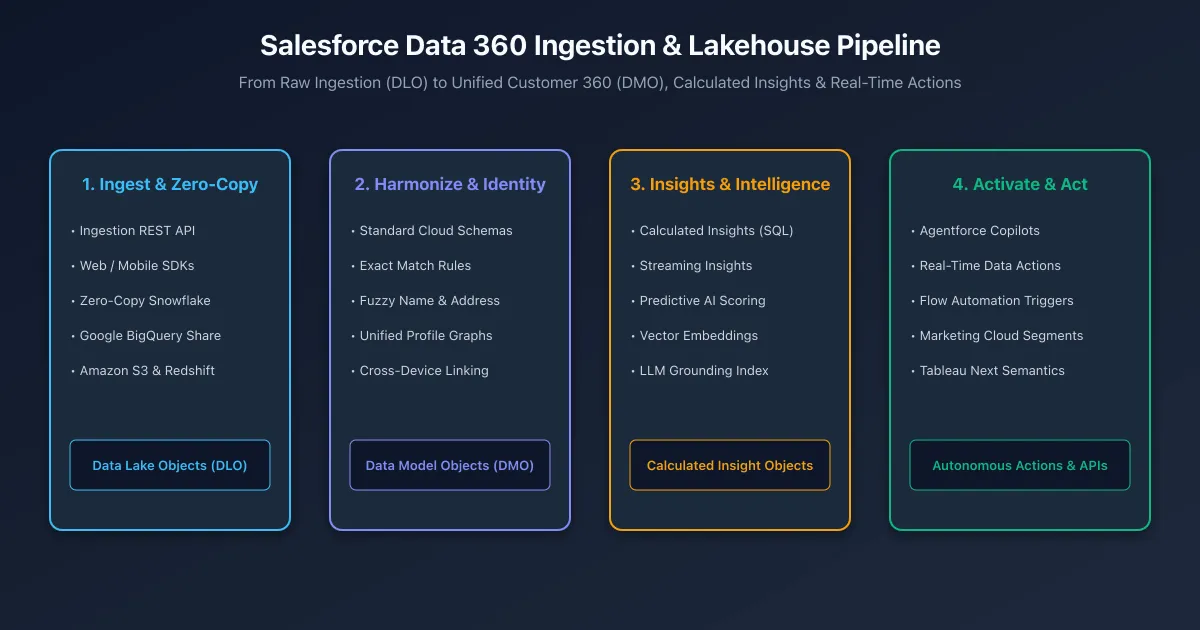
The 4-Stage Data 360 Pipeline
The end-to-end architecture flows through four distinct transformations:
Stage 1: Ingestion & Zero-Copy Federation
Data arrives in Data 360 through two primary patterns:
- Physical Ingest: Ingestion REST APIs, Mobile SDKs, Web Interactions SDK, or Amazon S3 connectors stream data into raw Data Lake Objects (DLOs).
- Zero-Copy Federation: Rather than copying petabytes of data, Data 360 establishes bi-directional federated shares with Snowflake, Google BigQuery, and AWS Redshift. Queries run directly against remote Apache Iceberg tables without data duplication or egress charges.
Stage 2: Harmonization & Identity Resolution
Raw DLOs map to canonical Data Model Objects (DMOs) aligned with the open-source Cloud Information Model (CIM).
- DLO-to-DMO Mapping: Transforms raw external schema fields into standardized entities (
Individual__dlm,ContactPointEmail__dlm,SalesOrder__dlm). - Identity Resolution Engine: Executes configurable reconciliation rules combining Exact Match (e.g., matching normalized Email + Phone) and Fuzzy Match (probabilistic string distance on First Name + Billing Address) to unify fragmented records into a single
UnifiedIndividual__dlmprofile graph.
Stage 3: Insights & Semantic Grounding
- Calculated Insights (CI): Multidimensional SQL queries evaluated on automated schedules to compute complex customer metrics (such as
Customer_Lifetime_Value__cioorAverage_Order_Frequency__cio). - Vector Search Indexes: Converts unstructured data (PDF manuals, customer cases, website scrapings) into dense vector embeddings using LLM embedding models, stored for low-latency retrieval.
Stage 4: Activation & Autonomous Action
Unified customer profiles and insights power real-time business action:
- Agentforce Grounding: Autonomous co-pilots query DMOs and vector indexes via Hosted MCP Servers (
data/data-cloud-queries). - Data Actions & Flow Triggers: Stream events fire automated Salesforce Platform Flows when calculated thresholds are breached (e.g., triggering a retention outreach flow when customer churn probability exceeds 80%).
Defining a Calculated Insight with SQL
Calculated Insights are defined using ANSI-compliant SQL. They require at least one dimension and one aggregation metric:
SELECT
    UnifiedIndividual__dlm.Id__c as Individual_Id__c,
    SUM(SalesOrder__dlm.GrandTotalAmount__c) as Total_Lifetime_Spend__c,
    COUNT(SalesOrder__dlm.Id__c) as Total_Order_Count__c,
    MAX(SalesOrder__dlm.OrderDate__c) as Last_Purchase_Date__c
FROM UnifiedIndividual__dlm
JOIN IndividualIdentityLink__dlm
    ON UnifiedIndividual__dlm.Id__c = IndividualIdentityLink__dlm.UnifiedRecordId__c
JOIN SalesOrder__dlm
    ON IndividualIdentityLink__dlm.SourceRecordId__c = SalesOrder__dlm.BillToContactId__c
WHERE SalesOrder__dlm.OrderStatus__c = 'Completed'
GROUP BY UnifiedIndividual__dlm.Id__c
Querying Data 360 Programmatically in Apex
Developers can query Data 360 Lakehouse tables directly from Apex using the ConnectApi.CdpQuery namespace:
public with sharing class DataCloudQueryService {

    public static List<Map<String, Object>> queryCustomerInsights(String unifiedId) {
        ConnectApi.CdpQueryInput queryInput = new ConnectApi.CdpQueryInput();
        queryInput.sql = 'SELECT Total_Lifetime_Spend__c, Total_Order_Count__c ' +
                         'FROM Customer_LTV_Insight__cio ' +
                         'WHERE Individual_Id__c = \'' + String.escapeSingleQuotes(unifiedId) + '\'';

        ConnectApi.CdpQueryOutput response = ConnectApi.CdpQuery.queryAnsiSql(queryInput);
        List<Map<String, Object>> records = new List<Map<String, Object>>();

        for (ConnectApi.CdpRow row : response.data) {
            Map<String, Object> recordMap = new Map<String, Object>();
            for (Integer i = 0; i < response.metadata.size(); i++) {
                recordMap.put(response.metadata[i].name, row.rowData[i]);
            }
            records.add(recordMap);
        }
        return records;
    }
}
Frequently asked questions
What is the architectural difference between a DLO and a DMO in Data 360?
A Data Lake Object is a raw storage table reflecting the source data structure as ingested. A Data Model Object is a standardized, harmonized entity conforming to the Cloud Information Model used for identity resolution and calculated insights.
How does zero-copy data federation work with Snowflake and BigQuery?
Data 360 uses secure data shares to query external lakehouses directly in place using Apache Iceberg tables, eliminating ETL pipelines, data duplication, and egress fees.
What is the difference between Exact Match and Fuzzy Match in Identity Resolution?
Exact Match links profiles based on normalized unique identifiers such as hashed email addresses or party IDs. Fuzzy Match evaluates probabilistic similarity across names and billing addresses to consolidate duplicate customer records.
How are Calculated Insights evaluated in Data 360?
Calculated Insights execute ANSI SQL aggregations across multidimensional DMOs on automated batch schedules or streaming windows, generating persistent metrics such as Customer Lifetime Value and Churn Probability.
How does Agentforce use Data 360 search indexes for semantic retrieval?
Data 360 vector search indexes transform unstructured knowledge articles and web content into embeddings, allowing Agentforce AI agents to perform semantic search and ground prompt responses in real time.
Comments
Questions, corrections and tips are welcome. Comments are GitHub Discussions, so you sign in with GitHub.