
Overview
Before building a Custom MCP Server, always check whether one of Salesforce’s prebuilt Platform Hosted MCP Servers already covers your use case. In Winter ’27 (API v68.0), Salesforce provides ready-to-use platform endpoints for standard and custom object access (sobject-*), dynamic API discovery and invocation (headless-360), cold-storage archive operations (Archive Connect), semantic schema discovery (metadata-grounding), Digital Experiences content management (content-readonly and content-write), and industry-specific product model verification (insurance-design-advisor).
Every prebuilt platform server shares the base URL https://api.salesforce.com/platform/mcp/v1.0/ (or https://<my-domain>/services/mcp/v1/d/ for My Domain routing) and executes strictly under the authenticated user’s OAuth 2.0 session.
Release: Winter ’27
The SObject server family, Headless 360 with Archive Connect (API v67.0+), Metadata Grounding, Salesforce CMS Read/Write servers (API v67.0 / v68.0), and Insurance Design Advisor (API v68.0) are available through the Salesforce Hosted MCP Servers framework.
SObject MCP Server Family (platform/sobject-*)
Rather than forcing every AI client to connect to a single monolithic CRUD server, Salesforce partitions SObject operations into four distinct Hosted MCP Servers. This allows architects to enforce server-level least privilege simply by choosing which URL to give an AI client.
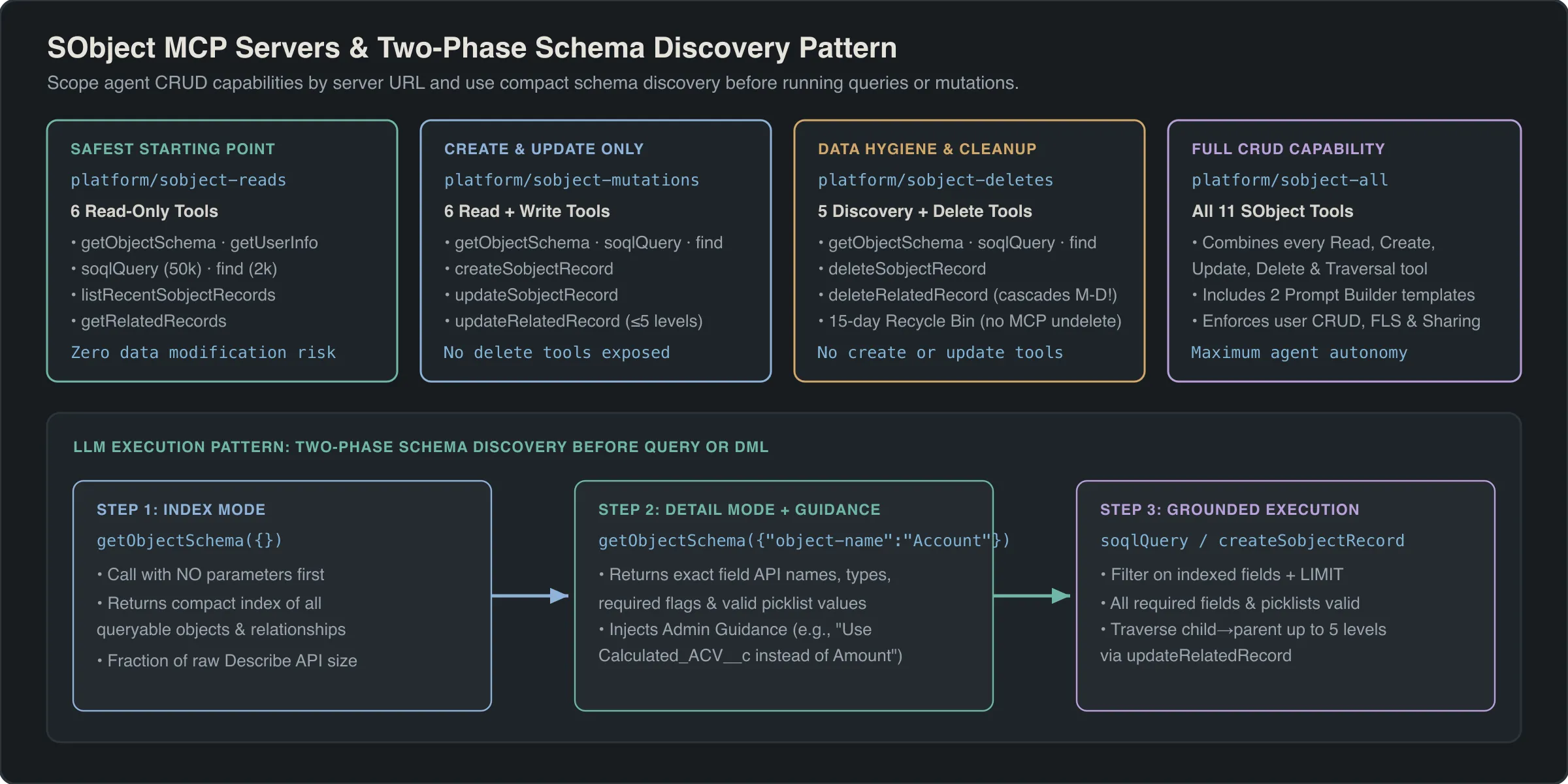
Comparing the 4 SObject Servers
| Server Path | Access Profile | Included Tools | Recommended Use Case |
|---|---|---|---|
platform/sobject-reads |
Read-Only (readOnlyHint: true) |
6 read & schema tools | Reporting agents, developer IDE schema assistants, read-only support triage |
platform/sobject-mutations |
Read + Create + Update (No Delete) | 6 read tools + 3 create/update tools | Sales & service co-pilots that log activities, create leads, or update stages |
platform/sobject-deletes |
Delete Only (destructiveHint: true) |
2 delete tools | Dedicated data-steward cleanup workflows with explicit human confirmation |
platform/sobject-all |
Full CRUD + Query | All 11 SObject tools | Full-featured admin/developer assistants in sandbox or tightly governed orgs |
Complete Reference: All 11 SObject MCP Tools
Every tool below respects the authenticated user’s profile, permission sets, Field-Level Security (FLS), and record-level sharing rules.
| Tool Name | Servers | Key Parameters | Limits & Execution Behavior |
|---|---|---|---|
getObjectSchema |
reads, mutations, all |
object-name (optional String) |
Two-phase discovery: Omit object-name for an index of accessible objects; pass object-name (e.g., "Opportunity") for fields, record types, relationships, and custom admin guidance. |
soqlQuery |
reads, mutations, all |
query (required String) |
Executes a dynamic SELECT SOQL query. Returns up to 50,000 records. Uses getObjectSchema first to verify field API names. |
find |
reads, mutations, all |
search (required String) |
Executes a dynamic FIND SOSL search across multiple objects. Returns up to 2,000 records. Ideal when the user provides a name, email, or phone number without knowing the object type. |
getUserInfo |
reads, mutations, all |
(none) | Returns identity, locale, time zone, profile, and org metadata for the currently authenticated Salesforce user. |
listRecentSobjectRecords |
reads, mutations, all |
sobject-name (required String) |
Returns the authenticated user’s recently viewed records (RecentlyViewed) for the specified object (e.g., "Account"). |
getRelatedRecords |
reads, mutations, all |
sobject-name, id, relationship-path |
Retrieves related child or parent records for a given record ID along relationship-path (e.g., "Contacts" or "Account.Owner"). |
createSobjectRecord |
mutations, all |
sobject-name (String), body (JSON Object) |
Inserts a single record and returns the new 18-character Salesforce ID. Fires all standard validation rules, before/after triggers, and record-triggered flows. |
updateSobjectRecord |
mutations, all |
sobject-name, id, body (JSON Object) |
Updates field values on an existing record by ID (idempotentHint: false). |
updateRelatedRecord |
mutations, all |
sobject-name, id, relationship-path, body |
Updates a related parent record directly via a child-to-parent relationship-path (supports traversing up to 5 levels, such as Contact -> Account -> Parent). |
deleteSobjectRecord |
deletes, all |
sobject-name (String), id (String) |
Moves the specified record to the Recycle Bin for 15 days (destructiveHint: true). No MCP undelete tool exists. |
deleteRelatedRecord |
deletes, all |
sobject-name, id, relationship-path |
Deletes a related record referenced via relationship-path (destructiveHint: true). |
Architect Best Practice: Injecting Admin Guidance into getObjectSchema
One of the most common reasons AI agents write broken SOQL queries is ambiguous custom field naming—for example, an org that has Amount, Total_ARR__c, and Net_Booking_Value__c on Opportunity.
When an AI client invokes getObjectSchema({"object-name": "Opportunity"}), the SObject MCP Server includes custom admin guidance configured in Setup -> Object Manager alongside standard field descriptions and help text. Populate clear, disambiguating descriptions on your core objects and fields in Object Manager (for example: “Always filter closed revenue queries by StageName = ‘Closed Won’ and use Net_Booking_Value__c instead of Amount for subscription deals”). Every MCP client that inspects the schema will automatically inherit those business rules before writing its soqlQuery.
Warning
Master-Detail Cascade Delete Risk: Neither deleteSobjectRecord nor deleteRelatedRecord has an undo or undelete counterpart in MCP. Furthermore, if an AI client deletes a master record in a Master-Detail relationship, Salesforce automatically cascade-deletes all detail child records. Never attach platform/sobject-all or platform/sobject-deletes to autonomous background agents without human-in-the-loop approval.
Headless 360 MCP Server (platform/headless-360)
While SObject servers handle record-level CRUD and SOQL, Salesforce exposes hundreds of specialized REST and Connect APIs (B2B Commerce, Scheduler, Loyalty, Archive Connect, and custom endpoints) that are not simple SObject table reads. The Headless 360 MCP Server (https://api.salesforce.com/platform/mcp/v1.0/platform/headless-360, Beta, requires API v67.0+) solves this without exposing thousands of individual tools that would overwhelm the LLM’s context window.
Instead, Headless 360 implements a three-stage Discover -> Describe -> Dispatch meta-tool pipeline:
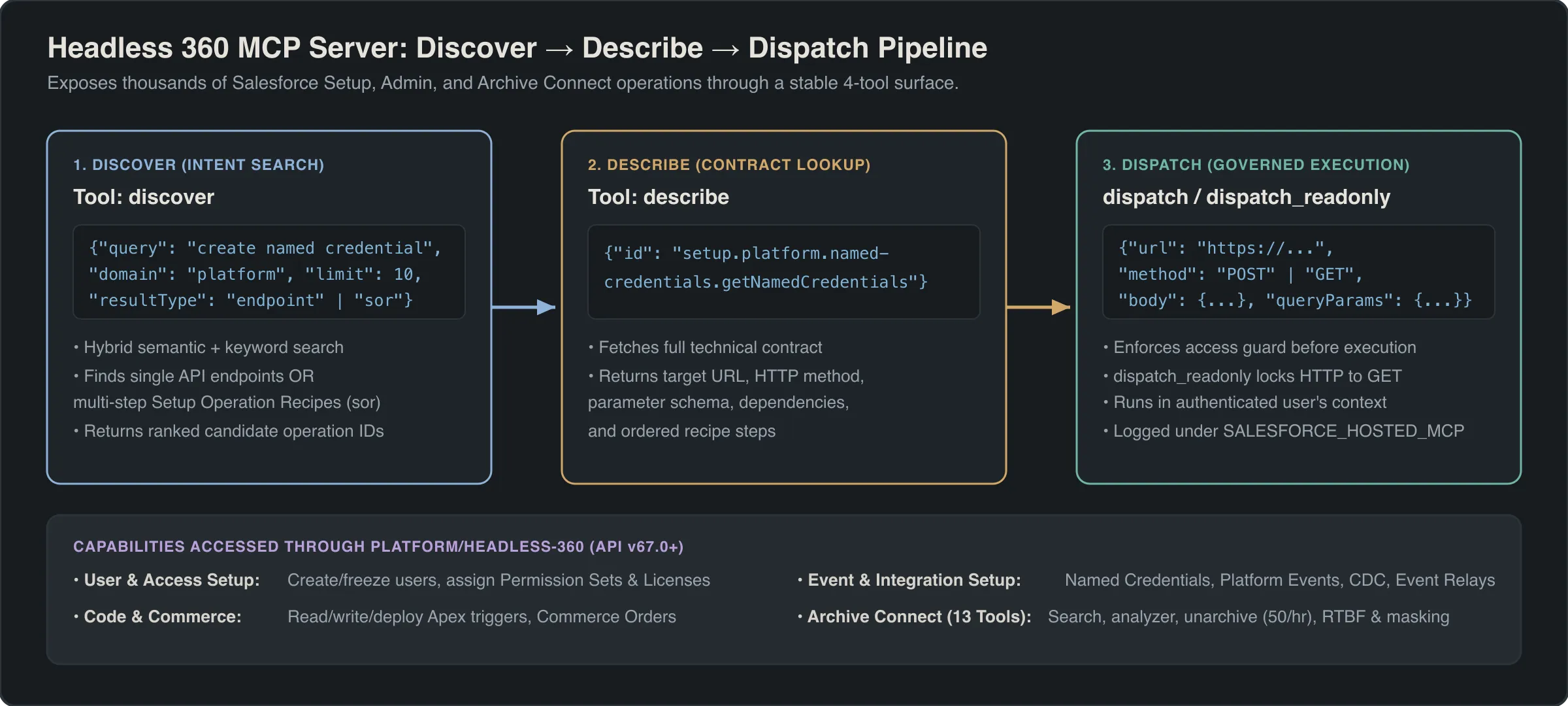
The 4 Headless 360 Core Tools
| Tool Name | Input Schema | Purpose & Behavior |
|---|---|---|
discover |
query (required String)limit (Integer, 1–50, default 10)domain (optional String)resultType ("endpoint" or "sor") |
Searches the org’s API Catalog using natural-language intent (e.g., "schedule service appointment" or "archive storage"). Returns matching API endpoints or System of Record ("sor") objects with their catalog ids. |
describe |
id (required String from discover) |
Returns the full OpenAPI specification for the selected endpoint id, including HTTP method, path parameters, request headers, JSON body schema, and response structure. |
dispatch |
url (required String)method (GET, POST, PATCH, PUT, DELETE)headers (optional Object)body (optional Object)queryParams (optional Object) |
Executes the target Salesforce API endpoint using the authenticated user’s token and returns the HTTP status and JSON response payload. |
dispatch_readonly |
url (required String)method (must be "GET")headers (optional Object)queryParams (optional Object) |
Safe read-only dispatcher (readOnlyHint: true) that strictly rejects any HTTP method other than GET. |
// Step 1: Discover endpoints matching intent
{
  "tool": "discover",
  "arguments": {
    "query": "organization limits and storage usage",
    "limit": 5,
    "resultType": "endpoint"
  }
}

// Step 2: Describe the matched endpoint ID returned by discover
{
  "tool": "describe",
  "arguments": {
    "id": "sfdc_rest_limits_v68"
  }
}

// Step 3: Execute safely via dispatch_readonly
{
  "tool": "dispatch_readonly",
  "arguments": {
    "url": "/services/data/v68.0/limits",
    "method": "GET"
  }
}
Archive Connect via Headless 360
Organizations using Salesforce Archive (API v67.0+, requires the Archive add-on license and the Archive Admin permission set) can manage cold-storage records, run compliance erasures, and restore archived hierarchies through 13 specialized Archive Connect tools exposed via the Headless 360 MCP Server.
Complete Reference: All 13 Archive Connect Tools
| Tool Category | Tool Name | Key Parameters & Operational Nuances |
|---|---|---|
| Global Search & Pagination | run-archive-global-search |
Searches archived records using 1 to 6 AND filter conditions (supports archive_date ranges). pageSize max 1000 (default 25). Returns HTTP 201 with a scroll_id; when scroll_id equals "-1", all pages have been exhausted. |
| Global Search & Pagination | get-archive-global-search-next-page |
Fetches the next page of results using the scroll_id returned by run-archive-global-search. Also returns scroll_id: "-1" on the final page. |
| Sharing-Aware Search | run-archive-global-search-with-sharing-rules |
Evaluates archived records against Salesforce sharing rules. Important quirk: Validation failures still return HTTP 201—you must inspect "isSuccess": false in the response payload to detect errors. |
| Storage Telemetry | get-organization-archive-storage-used |
Returns two 4-element byte arrays: usedStorage[4] and availableStorage[4]. Indices 0 and 1 represent general org data/file storage; indices 2 and 3 represent archive-tier storage in bytes. |
| Smart Analyzer | run-analyzer |
Starts an asynchronous Smart Analyzer job to profile candidate records for archiving and estimate storage savings. |
| Smart Analyzer | get-analyzer-report |
Retrieves the status and findings of a Smart Analyzer job initiated by run-analyzer. |
| Unarchiving | run-unarchive |
Restores archived records and their full parent-child hierarchy back into live Salesforce SObjects. Governed by a hard limit of 50 requests per hour per org and 1,000 records per request. |
| GDPR / Compliance (RTBF) | run-rtbf |
Initiates a Right to Be Forgotten (RTBF) permanent deletion job in the archive store. Shares a combined 10,000 root records/day org limit with run-masking. Max 10 exact-match criteria per request. Skips records under legal hold. |
| GDPR / Compliance (RTBF) | get-rtbf-status |
Polls an RTBF job until its lifecycle state reaches "HANDLED". |
| Data Masking | run-masking |
Permanently obfuscates sensitive fields on archived records. Shares the 10,000 root records/day org limit with run-rtbf, max 10 exact-match criteria per request, and skips records under legal hold. |
| Data Masking | get-masking-status |
Polls a masking job until its status reaches "HANDLED". |
| Activity & Error Logs | get-archive-execution-details-streaming-url |
Accepts an ArchiveActivity record ID (key prefix 8qv...) and returns a pre-signed streaming URL to download full execution details. |
| Activity & Error Logs | get-archive-failed-records-streaming-url |
Accepts an ArchiveActivity record ID (8qv...) and returns a pre-signed streaming URL to download CSV/JSON logs of records that failed archiving. |
Warning
Irreversible Compliance Operations: Both run-rtbf and run-masking modify cold-storage archive data permanently. Once get-rtbf-status or get-masking-status reports "HANDLED", the original archived values cannot be recovered via run-unarchive or Salesforce Support. Always verify exact-match filter criteria with run-archive-global-search first.
Metadata Grounding MCP Server (platform/metadata-grounding)
In enterprise orgs with 2,000+ custom objects and 50,000+ custom fields, even getObjectSchema requires knowing which object names to inspect. The Metadata Grounding MCP Server (https://api.salesforce.com/platform/mcp/v1.0/platform/metadata-grounding, Beta) uses Data 360 and the Salesforce Catalog to provide semantic and keyword search across your entire org schema.
Prerequisites & Environment Constraints
- Requires Data 360 enabled and the Salesforce Catalog metadata index provisioned.
- Not supported in Scratch Orgs or namespaced Developer Edition orgs.
- Only active picklist values are indexed (inactive picklist values are excluded from search results).
- Strictly read-only (
readOnlyHint: true).
The 3-Step Metadata Grounding Workflow
describe_metadata: Call first to discover the searchable metadata entity types and attributes indexed in the Salesforce Catalog.search_metadata: Perform semantic or keyword search across objects, fields, relationships, and active picklist values (for example, searching"customer churn risk score"to locateAccount.Churn_Probability_Pct__c).query_metadata: Execute structured queries against the catalog metadata tables to retrieve exact relationships, data types, and compliance classifications before handing the discovered API names to the SObject MCP Server.
Salesforce CMS MCP Servers (platform/content-readonly & platform/content-write)
Teams building Digital Experiences sites can manage enhanced CMS workspaces, content variants, translations, and publication lifecycles through two dedicated CMS Hosted MCP Servers designed for Agentforce Vibes.
Prerequisites
- Digital Experiences and Salesforce CMS must be enabled in Setup.
- The authenticated user must be assigned a Content Admin or Content Manager contributor role inside the target enhanced CMS Workspace.
Server Comparison & Key Capabilities
| Server Path | Min API Version | Tool Count | Key Tools & Capabilities |
|---|---|---|---|
platform/content-readonly |
v67.0 | 22 read-only tools | Inspect CMS workspaces (list_cms_workspaces, get_cms_workspace), channels (list_cms_channels), content types (list_cms_content_types), folders, collections, and published/draft content items (get_cms_content, search_cms_content). |
platform/content-write |
v68.0 | 15 write tools | Provision workspaces and web app channels (get_or_create_cms_workspace_and_web_app_channel), create content (create_cms_content), update variants (update_cms_content_variant), manage folders/collections, and publish or unpublish (publish_cms_content, unpublish_cms_content). |
Tip
Mutually Exclusive Parameters on update_cms_content_variant: When updating a CMS content variant via platform/content-write, the tool accepts either a structured contentBody JSON object or a natural-language prompt string for generative AI authoring—never both in the same call. Passing both contentBody and prompt simultaneously will fail schema validation.
Insurance Design Advisor MCP Server (platform/insurance-design-advisor)
Available in API v68.0+, the Insurance Design Advisor MCP Server (https://api.salesforce.com/platform/mcp/v1.0/platform/insurance-design-advisor) is a read-only design-time verification server for architects and product configurators working with Salesforce Insurance (Product Catalog Management, Constraint Modeling Language, and Salesforce Pricing) inside Agentforce Vibes.
All 9 Insurance Design Advisor Tools
| Tool Name | What It Validates or Resolves | Architect Notes & Edge Cases |
|---|---|---|
validateProductModel |
Verifies root insurance products, coverages, insured items, child specs, and cardinality rules. | Run first after configuring a new root product in Product Catalog Management (PCM). |
validateProductDiscovery |
Audits Product Discovery Context Definitions, mapping tags, and qualification rules. | Known validation rule: You must pass a valid lookup identifier; invoking without a lookup returns error SF-INS-DSAV-00038. |
validateAttributes |
Checks product attributes, picklists, default values, and dynamic attribute bindings. | Automatically resolves dynamic DYN__INS__ namespace prefixes during validation. |
validateCMLModel |
Parses and validates Constraint Modeling Language (CML) rules associated with insurance products. | Catches circular dependencies and unsatisfiable coverage constraints before activation. |
validatePricingSetup |
Checks Pricing Procedures, Decision Tables, and attribute-based rate cards. | Confirms that all input variables expected by the pricing procedure are mapped from the context definition. |
validateApiRequest |
Validates JSON request payloads against the org’s active product model before calling runtime APIs. | Specifically supports validating payloads for /connect/insurance/quotes and /connect/insurance/product-rating. |
lookupErrorCode |
Explains the root cause and remediation steps for any Insurance engine error code. | Accepts error codes matching the pattern SF-INS-<category>-NNNNN (for example, SF-INS-DSAV-00038 or SF-INS-RATE-00102). |
validateUserPermissions |
Audits whether a specified user has all required PSLs, object permissions, and context access. | Eliminates silent runtime failures where a quoting user lacks read access to an underlying rating table. |
getRatingInput |
Generates a valid sample rating input JSON payload for a given root insurance product. | Ideal for bootstrapping Postman tests or automated Apex integration tests for new insurance products. |
Summary Decision Matrix: Which Platform Server Should You Use?
| Requirement | Target Hosted MCP Server Path |
|---|---|
| Query SObjects and inspect schemas without modifying data | platform/sobject-reads |
| Create and update CRM records without allowing record deletion | platform/sobject-mutations |
| Discover and invoke arbitrary Salesforce REST / Connect APIs dynamically | platform/headless-360 |
| Search, unarchive, mask, or run GDPR RTBF on cold-storage Archive records | platform/headless-360 (Archive Connect tools) |
| Semantically search across thousands of custom objects and fields | platform/metadata-grounding |
| Author, translate, and publish Digital Experiences CMS content | platform/content-readonly & platform/content-write |
| Validate Insurance PCM models, CML rules, and rating payloads | platform/insurance-design-advisor |
Frequently asked questions
What is the difference between the four SObject Hosted MCP Servers?
Salesforce splits SObject tools into four servers for least privilege: sobject-reads has 6 read and schema tools; sobject-mutations adds record creation and updates; sobject-deletes isolates record deletion; and sobject-all includes all 11 tools.
How does getObjectSchema avoid overflowing the AI context window on large custom objects?
It uses a two-phase discovery pattern. Calling it without parameters returns a lightweight object index. Calling it with an object-name returns field metadata, relationships, and custom admin guidance for only that object.
What are the query row limits for soqlQuery and find on SObject MCP Servers?
The soqlQuery tool executes dynamic SOQL and returns up to 50,000 records per query, while the find tool executes dynamic SOSL text search across multiple objects and returns up to 2,000 records. Both enforce user profile permissions, FLS, and sharing rules.
Can an AI client undelete a record after calling deleteSobjectRecord or deleteRelatedRecord?
No. Neither SObject MCP server exposes an undelete tool. Deleted records move to the Salesforce Recycle Bin for 15 days and must be restored in the UI or via Apex. Deleting a master record also cascade-deletes all detail records.
How does the Headless 360 MCP Server execute Salesforce REST APIs without custom code?
Headless 360 exposes a three-step pipeline: discover searches the org API catalog by natural-language intent, describe retrieves the exact endpoint schema and parameters, and dispatch (or dispatch_readonly for GET calls) executes the HTTP request.
What are the daily limits and irreversibility rules for Archive Connect RTBF and masking tools?
The run-rtbf and run-masking tools share an org limit of 10,000 root records per day, accept at most 10 exact-match criteria per request, and skip records on legal hold. Both operations are permanent and irreversible once status reaches HANDLED.
Why does the Metadata Grounding MCP Server not work in scratch orgs?
The Metadata Grounding server relies on Data 360 and the Salesforce Catalog to index org metadata for semantic and keyword search. Because Salesforce Catalog indexing is not supported in scratch orgs or namespaced DE orgs, those environments cannot use it.
What does the Insurance Design Advisor MCP Server validate?
Available at platform/insurance-design-advisor on API v68.0+, it provides nine read-only tools that validate Product Catalog Management models, Product Discovery Context Definitions, CML constraints, Pricing Procedures, REST payloads, permissions, and error codes.
Comments
Questions, corrections and tips are welcome. Comments are GitHub Discussions, so you sign in with GitHub.